Block It First: The Film Craft Behind AI Video Workflows
Why slot-machine prompting fails, how studios separate geometry from paint, and how to direct AI video using classic camera craft.
Most people generate AI video like playing a slot machine. You type a prompt, hit generate, watch the camera wander off target, adjust a few adjectives, and roll again. Twenty attempts and dozens of credits later, you end up with a shot that is seventy percent acceptable and no way to fix the remaining thirty percent. The text box gives you no knobs to turn.
Filmmakers solved this exact problem decades ago. You block the scene first in plain, untextured geometry. You lock the camera move. You dial in the cut timing on the timeline. After the foundation works, you spend money on the final look.
In traditional production, the expensive stage was a film set or a 3D render farm. Today, that stage is a generative diffusion model. The production logic stays the same.
The two halves of a shot: geometry and paint
Every finished shot contains two separate layers of information:
- Structure: Camera position, focal length, cuts, timing, actor positions, and sightlines. This is pure geometry and time.
- Style: Surfaces, lighting, skin texture, wardrobe, color palette, and medium.
Live-action filming bundles these layers together. You cannot film an actor opening a door without building the door and lighting the room.
Diffusion models break that link. When you supply the underlying geometry yourself, the model only handles style. Machine learning models excel at rendering surface aesthetics, but struggle with spatial reasoning over a thirty-second sequence. Giving the model a spatial blueprint lets it focus on what it does best.
Why studios build the sequence twice
In professional film pipelines, previsualization (previz) sits between storyboards and principal photography.
Storyboards are static sketches. Animatics cut those sketches together against scratch audio to test pacing. Previz takes the next step by placing digital cameras in a virtual 3D scene. Every move is measurable. You know the exact lens, the travel distance in meters, and the duration down to the frame.
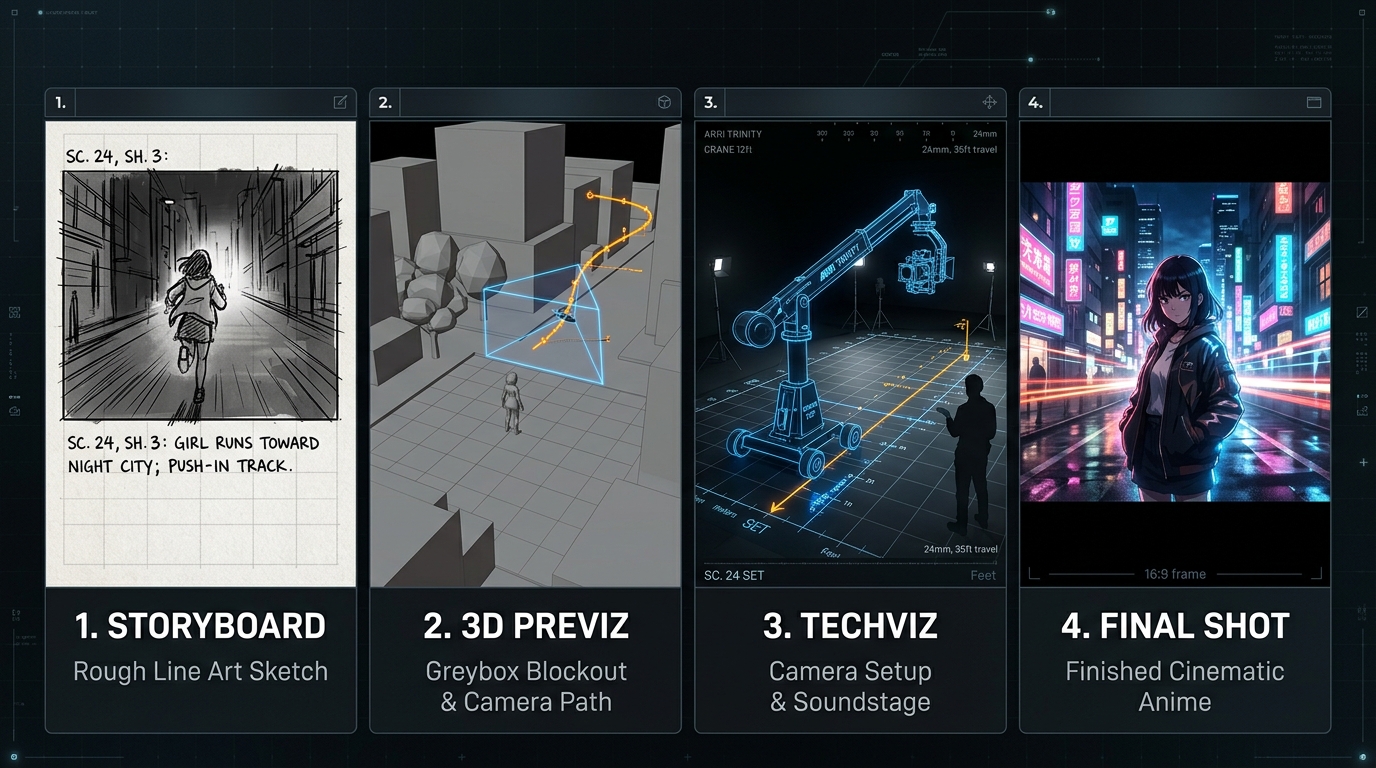
Feature pipelines divide this into specific stages:
- Techviz: Previz built within physical studio limits. It verifies crane reach, stage dimensions, and track layout before anyone rents equipment.
- Postviz: Rough 3D elements comped over live plates so editors can shape the cut before visual effects studios deliver final shots.
Studios like The Third Floor build entire businesses on previz. Making changes while looking at unlit grey shapes costs almost nothing. Making changes on set with a full crew on the payroll burns tens of thousands of dollars an hour.
Greyboxing and the playblast
Greyboxing means building a set out of basic geometric primitives. A corridor is an elongated cube. A coffee cup is a cylinder. People sitting at a dinner table are simple capsules. There are no faces, hands, clothes, or lighting calculations.
Removing visual detail keeps attention on what matters early on: camera placement, pacing, and staging. Human animators and generative models both struggle with faces and hands. Stripping those elements out leaves you with pure spatial choreography.
In 3D software like Blender or Maya, a playblast (or viewport render) records the unlit viewport directly to video. It processes in seconds instead of hours. Animators use playblasts to check motion and timing without waiting for raytracing.
In an AI pipeline, the playblast serves a dual purpose. It functions as an editing check, and it acts as the primary control signal you pass to the diffusion model.
What the model extracts from your reference
Feeding a grey playblast into a video model relies on conditioning, similar to ControlNet in image generation.
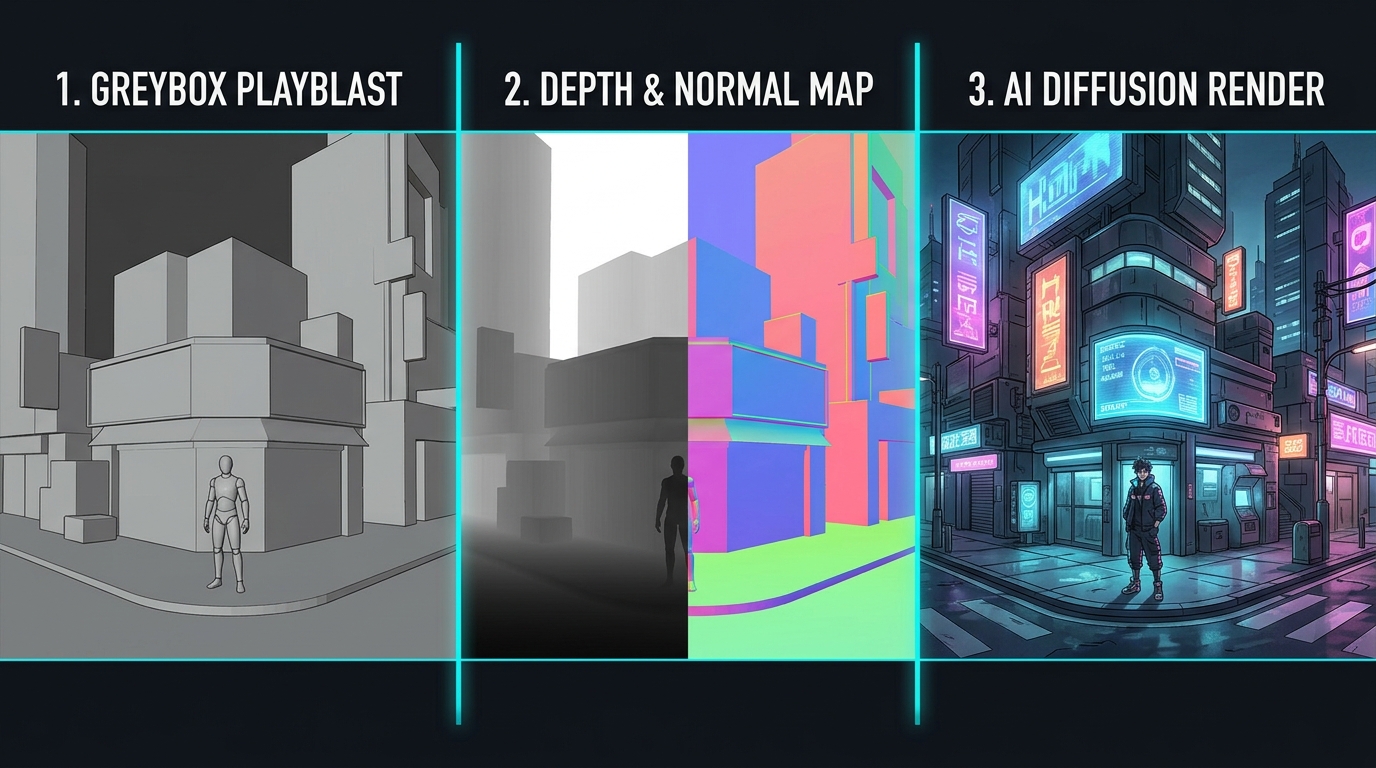
Common structural passes include:
- Depth pass (Z-depth): Encodes distance from the camera on a grayscale gradient. This is the cleanest signal for preserving 3D layouts across different styles. A depth pass of a car chase looks the same whether rendered as anime or photorealistic film.
- Surface normals: Encodes surface orientation, showing the model how light should fall across curved objects.
- Line extraction: Traces silhouettes and edges to maintain compositional framing.
- Pose estimation: Locks skeleton positions and limb movement.
- Cryptomattes and segmentation: Marks distinct objects with flat colors so the model keeps costumes, props, and backgrounds separated.
A clean clay render already contains natural depth gradients and surface curvature, so modern video models extract these cues without extra setup.
One practical shortcut: avoid blocking complex physics like water, fire, smoke, or flowing cloth. Simulating fluid dynamics in 3D takes time, while diffusion models generate believable fire and liquid from text prompts. Leave those areas empty in the greybox, describe the effect in your prompt, and let the model paint the simulation.
Camera mechanics in 3D space
To guide generative shots with precision, use standard cinematography principles:
Focal length and parallax
- Focal length: A 24mm wide lens exaggerates depth and speeds up motion toward the glass. An 85mm long lens compresses space, stacking foreground and background together. In 3D, focal length is a single animatable number.
- Parallax: Moving the camera through space (a dolly or truck) causes nearby objects to move past the frame faster than distant backgrounds. This translation provides the primary visual cue for depth. A panning camera pivoting on a tripod cannot replicate this physical presence.
Human camera operation
- Aim targets with lag: Do not lock the camera directly to a character’s face. Place a tracking target slightly off-center and add slight follow latency. That brief delay mimics a human camera operator reacting to an actor’s movement.
- Handheld noise: Add low-amplitude, low-frequency variation to camera position and rotation. Subtle drift makes a virtual camera feel grounded. Heavy shake looks fake.
- Ease curves: Cameras have weight. Setting acceleration and deceleration curves on keyframes prevents sudden mechanical starts and stops.
Motion control and repeatability
In commercial cinematography, robotic camera rigs like the Bolt execute pre-programmed paths with millimeter accuracy. John Dykstra built the first digital motion-control system (the Dykstraflex) for Star Wars in 1976 to achieve absolute repeatability. He filmed model spaceships, pyrotechnics, and starfields across separate passes, knowing they would line up perfectly in the optical printer.
That same repeatability is the secret to styling AI video.
Enforcing cinematic continuity
Diffusion models have no memory of earlier generations. They do not track who sat on which side of the room or which direction a car was driving. Left on their own, AI shots break basic editing rules.
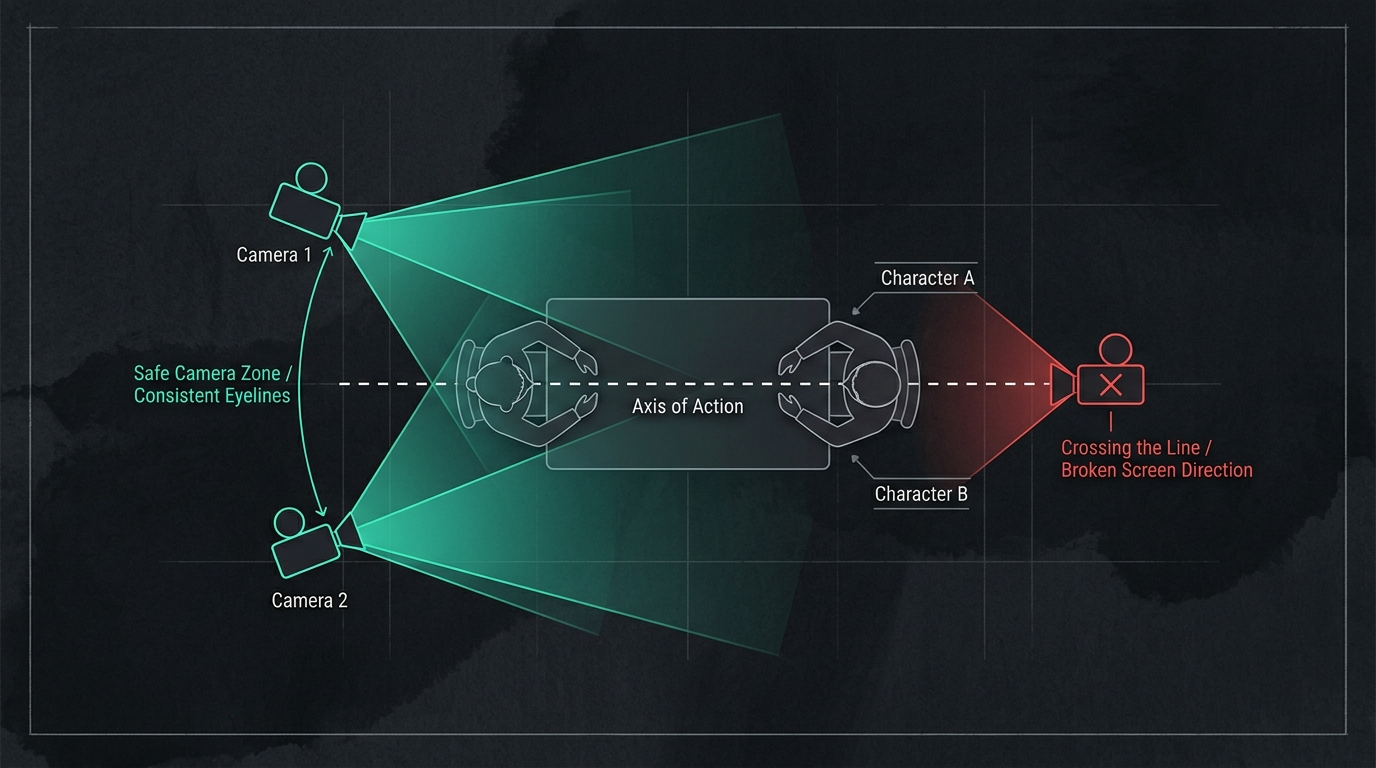
Blocking scenes in 3D enforces continuity geometrically before rendering:
- The 180-degree rule: Keep all cameras on one side of the action line. Characters maintain consistent screen positions (left stays left, right stays right) across cuts.
- Eyeline matching: In dialogue scenes, characters look toward the offscreen position of their counterpart.
- The 30-degree rule: Shift the camera position by at least thirty degrees between cuts of the same subject to avoid jarring jump cuts.
- Screen direction: A vehicle exiting frame right must enter the next shot from frame left unless an on-screen turn explains the change.
Placing cameras in a shared 3D blockout turns continuity from a random guess into a mathematical rule.
The cost-of-change curve
The MacLeamy curve in architecture illustrates a universal production truth: your influence over a project is highest at the start, while the cost of making changes climbs steeply near the deadline.
Generative video without blocking suffers from an extreme version of this curve. Text prompts cannot isolate individual variables. Changing a single word to fix a character’s hand re-rolls the entire composition, shifting lighting, background objects, and camera angles.
Greyboxing gives you non-destructive isolation. If a sequence feels slow, you adjust camera curves and cut points on the 3D timeline. The foundation updates immediately, while your styling prompt remains intact.
One cut, multiple styles
Because your structural edit exists as a separate 3D file, you can restyle the same scene without re-blocking:
- Version A: Wet asphalt, neon signs, and cyberpunk lighting.
- Version B: 1980s cel animation with ink lines and flat colors.
- Version C: Monochrome noir with hard shadows.
Every version shares the same cuts, lenses, and camera velocity. When presenting ideas to collaborators or clients, you lock the rhythm of the cut first, then audition visual styles without starting over.
The zero-credit production loop
The practical workflow follows a clear sequence:
- Write the shot list: Note lens choices, camera moves, durations, and cut points.
- Block in primitives: Place simple boxes and character proxies in the scene.
- Playblast the edit: Drop the raw viewport renders onto a timeline with voiceover and temporary music. Evaluate the pacing in context.
- Refine camera movement: Adjust Bezier curves, camera lag, and framing.
- Iterate in grey: Run steps 3 and 4 until the scene works on timing and geometry alone. This stage uses no cloud compute credits.
- Generate the final pass: Pass the playblast as depth or pose conditioning with your style prompts.
- Address notes at step 4: When revisions come in, adjust the 3D blockout rather than rolling new random prompts.
Where the pipeline breaks (and why we built BentoStream)
The challenge with this workflow has always been software fragmentation.
Directing this way previously required a complicated chain: a 3D package like Blender, custom extraction scripts in ComfyUI, cloud generation services, and a desktop editor like Premiere or DaVinci Resolve. Assets got scattered across folders, frame rates drifted, and version tracking fell apart.
We built BentoStream Studio to bring this entire workflow into a single browser window:
- Cinematics (browser 3D staging): Stage primitive props and characters, configure virtual lenses, and animate camera paths with real-time WebGPU viewport previews. No desktop installations or GPU driver management.
- Cut (multi-track timeline): Place playblasts directly against dialogue and audio tracks to test pacing before generating final video.
- Direct diffusion passes: Send camera depth and normal data straight from the timeline to fine-tuned models with one click.
- Flow (node compositor): Color grade footage, apply lighting effects, and composite layers in the same workspace.
- Universe vaults: Store character model sheets, color palettes, and style weights to keep faces and environments consistent across episodes.
The fundamentals of visual storytelling have stayed consistent for a century: establish clear staging, move the camera with purpose, and maintain spatial coherence. BentoStream provides the tools to apply those fundamentals to generative video.
Quick Reference Glossary
| Term | Definition |
|---|---|
| Animatic | Storyboard panels cut together on a timeline with scratch audio and dialogue. |
| Previz | A rough, timed 3D animatic used to plan complex camera moves and staging before production. |
| Techviz | Previz constrained by the physical limits of real gear such as crane reach and studio dimensions. |
| Greybox / Blockout | A scene assembled out of simple, untextured 3D primitives (boxes, cylinders, capsules). |
| Playblast | A real-time viewport capture that records animation timing without waiting for full rendering. |
| Z-Depth Pass | A greyscale image encoding pixel distance from the lens; used for spatial guidance. |
| Conditioning | Passing structural signals (depth, edges, poses) alongside text prompts to guide model diffusion. |
| 180-Degree Rule | Keeping the camera on one side of an imaginary line between subjects to preserve screen direction. |
| Parallax | The visual shift where foreground elements move faster across the frame than background elements. |
| Dolly Zoom | Translating the camera closer while zooming out (or vice versa), warping spatial perception. |
| Ease Curves (F-Curves) | Bezier curves that govern the acceleration and deceleration of camera and object motion. |
| Non-Destructive | A workflow where raw parameters remain editable rather than permanently baked into flat video. |